Reuse customers and items
Keep business contacts and goods or services ready for the next invoice. Review quantities, prices and tax treatment for each sale.

Risiti eTIMS invoicing
Prepare the sale once. Risiti sends it through your configured KRA connection, shows the response clearly, and keeps the accepted receipt ready to download or share.
KRA response visible
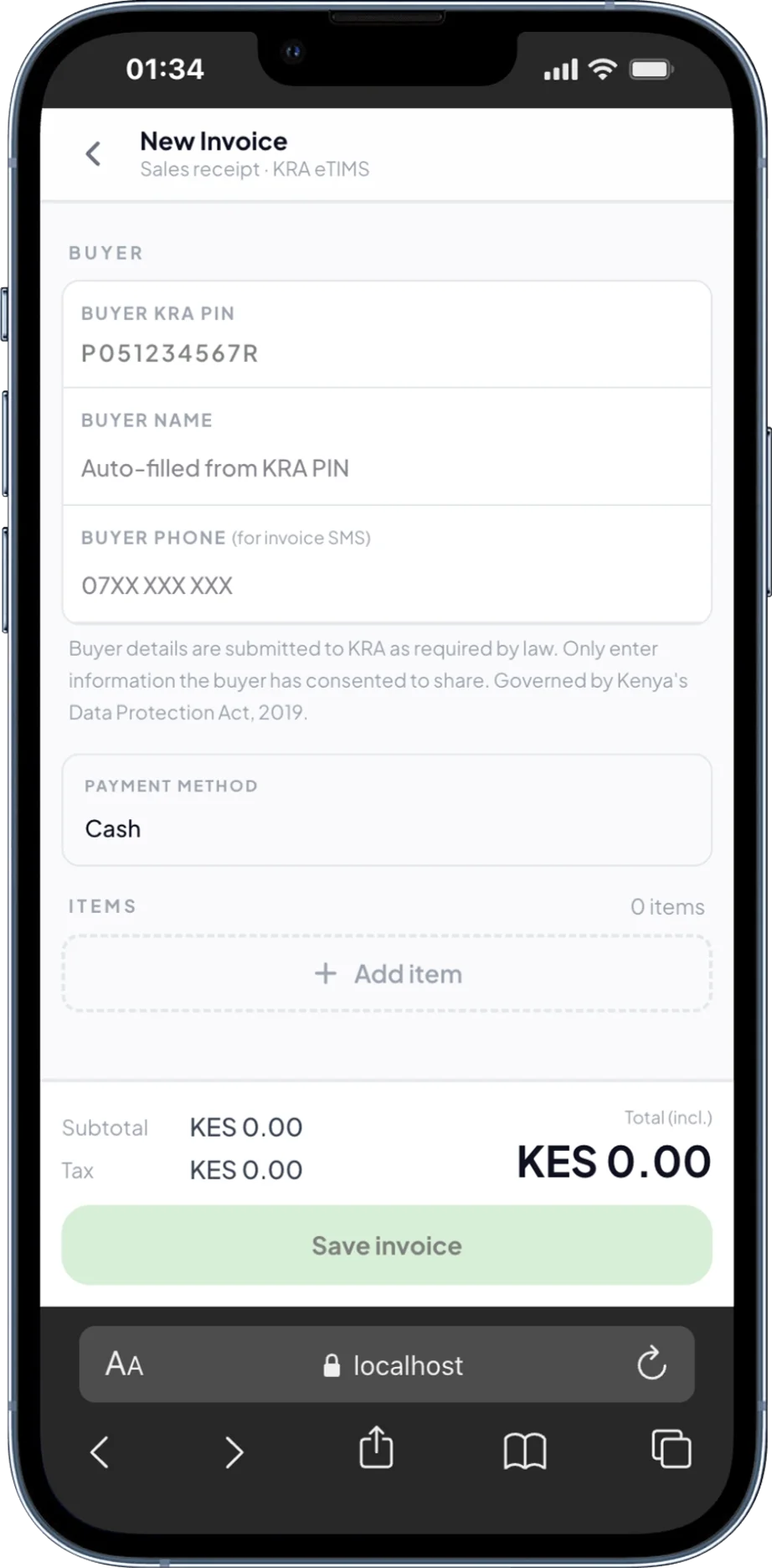
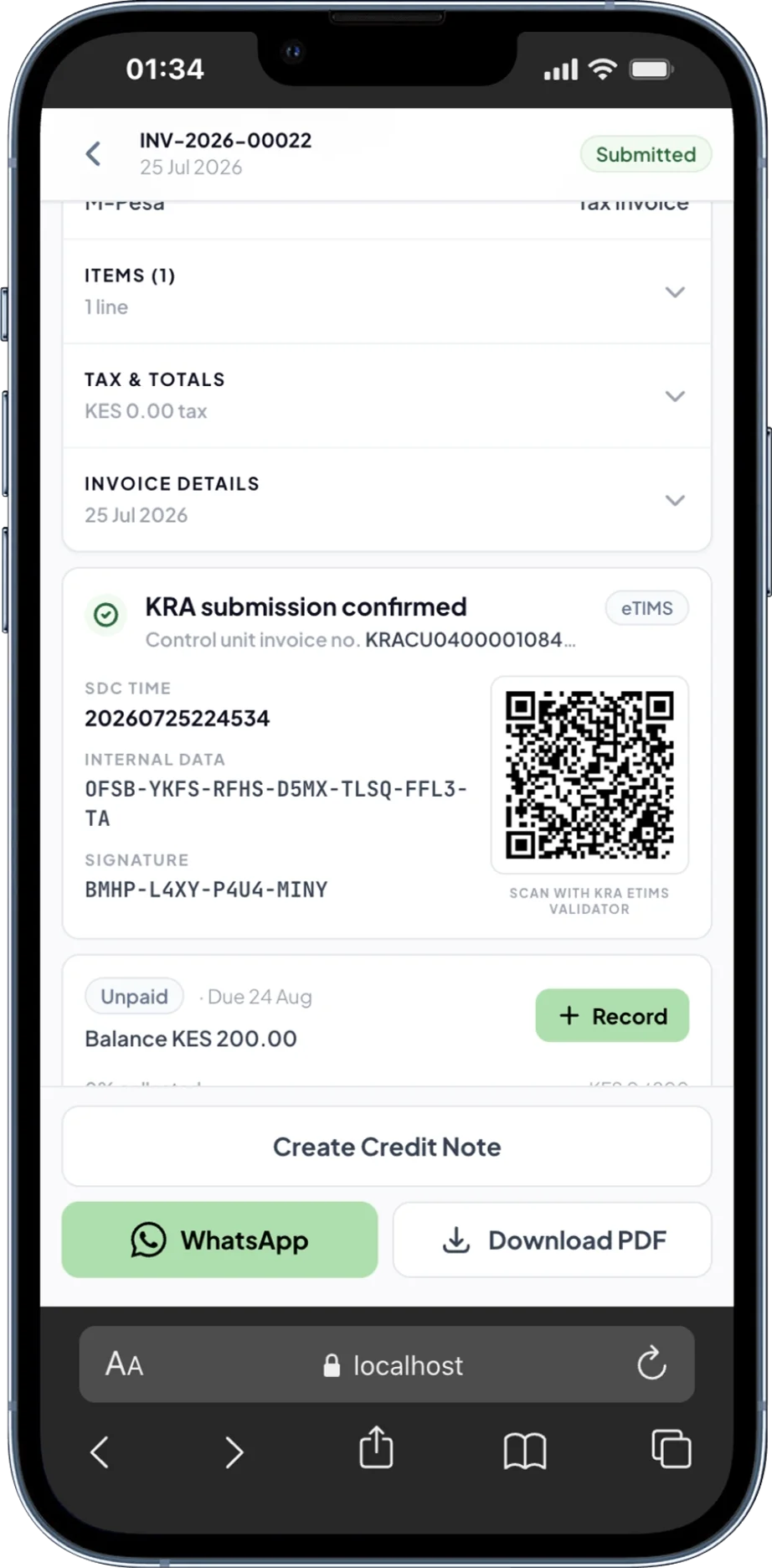
A short, visible workflow
The important part is not merely generating a document. It is knowing what was sent, what KRA returned and what needs attention.
Add the buyer, choose saved goods or services, confirm quantities and prices, then review the tax and total before submitting.
Risiti keeps pending, accepted and failed submissions distinct, so a document is not mistaken for a completed KRA receipt.
After acceptance, review the returned receipt data, download the invoice PDF and share it from the same record.
No ambiguous success screen
A neat-looking PDF is not proof of KRA acceptance. Risiti keeps the submission state and returned receipt data attached to the invoice.
Understand invoice statusesThe work around every invoice
Risiti App brings the sale, submission, payment and receipt into one browser workflow. These are App features; integrating your own software uses a separate API product.
Keep business contacts and goods or services ready for the next invoice. Review quantities, prices and tax treatment for each sale.
Review paid and unpaid amounts, overdue customers and receivables aging alongside your sales records.
Paste an M-Pesa SMS or enter the payment details, select the matching invoice, then confirm the payment yourself.
Create an eligible credit note from its submitted original, with selected quantities and a reason. The App currently supports one credit note per original invoice.
Download accepted invoice PDFs and share via WhatsApp. Choose buyer SMS when you have the buyer's permission and a valid phone number.
Save new invoice details in the device's offline queue and reconnect to submit. Offline capture is not KRA acceptance; check the final status before sharing.
Invoice and payment records do not replace your tax return or determine whether an expense qualifies for a deduction. Need a phone walkthrough? Compare phone invoicing options and follow the steps.
Price the workflow you need
Choose App for invoicing in your browser, Direct API for one business's software, or Platform API for multiple merchants. Each workspace has one product mode; App pricing does not include API usage.
Risiti App
KES 999
per month
One business creating invoices in Risiti App, with no per-document usage charge.
Join the App waitlistRisiti App
KES 49
per active Nairobi sales day
One daily charge after the first successfully fiscalized document that day; further documents that day do not add another daily charge.
Join the App waitlistIllustrative access charges for one paid month. An active day is triggered by successful fiscalization, including an eligible credit note—not by opening the App. Flexible usage is billed monthly.
| Active days | Pay as you sell | Monthly |
|---|---|---|
| 8 days | KES 392 | KES 999 |
| 20 days | KES 980 | KES 999 |
| 21 days | KES 1,029 | KES 999 |
| 22 days | KES 1,078 | KES 999 |
At these rates, monthly costs less from 21 active days in a month.
These examples do not include a free-period adjustment, a negotiated agreement or separately quoted services. They do not promise an automatic price cap or plan switch. Confirm your plan and payment terms before activating paid access.
KES 1.5 per successful fiscal document
Connect one business's software under its own taxpayer identity. No recurring platform fee.
KES 4,999 per month + KES 1 per successful fiscal document
For software serving multiple merchant businesses. Includes 25 active merchants; ask about additional-merchant terms.
API document usage follows successful production fiscal documents, including applicable corrections—not HTTP requests or retry attempts. Sandbox requests are not billable usage. Platform access charges are separate.
Explore eTIMS API integration and the sandboxAuthored public catalogue: PUBLIC_2026_08_V3. Published pricing loads when available; your workspace's assigned catalogue governs its actual bill. Confirm current prices and any separately quoted support or committed-volume terms before purchase.
Before the first invoice
Choose for the work you do
The tax obligation is the same. The difference is the operating workflow you need around each invoice.
Reusable records, explicit submission states, accepted receipt PDFs, sharing and a controlled path for temporary failures.
See App pricing examples Compare eTIMS invoicing appsKRA provides free eTIMS options for applicable taxpayers. The best route depends on registration status and operating model.
Compare the official routesStraight answers
Yes. Risiti is a browser-based workflow designed to work on a phone. You prepare the sale, submit it through the configured KRA connection, then keep the returned receipt data with the invoice.
No. Risiti is an independent product from PesaStack Limited. It helps manage the invoicing workflow, while the KRA system returns the acceptance and receipt data.
Keep one invoice record and avoid creating duplicates while acceptance is uncertain. Risiti keeps the status visible and uses a controlled retry workflow for eligible temporary failures.
Share it as the completed eTIMS invoice only after the record shows the accepted status and includes the required KRA receipt data.
Ready for the next sale?
Open Risiti to prepare the sale, follow the KRA status and keep the completed receipt where you can find it.
Create an eTIMS invoiceProduct copy and catalogue examples updated 16 September 2026. These describe implemented workflows, not a new production or timed phone test. Risiti is the getrisiti.com product from PesaStack Limited and is not an official KRA portal. Review the available official solutions on the KRA eTIMS service page. This page is not tax advice.